> ## Documentation Index
> Fetch the complete documentation index at: https://docs.hotfix.jobs/llms.txt
> Use this file to discover all available pages before exploring further.
> ## Agent Instructions
> Product noun is jobs.
> MCP at https://rest.hotfix.jobs/mcp is the hiring contract for agents. Clients sign in with Hotfix; API keys are for HTTP only.
> Do not invent unpublished REST or hiring stats. Webhooks are set up in the app; there is no REST route or MCP tool to manage them.
> Do not mention Greenhouse, Ashby, Quick Apply, or claim.
> Creating a draft, offer, or booking link does not send email.
# Team
> Invite teammates, understand what Owners, Admins, and Members can do, and change roles.
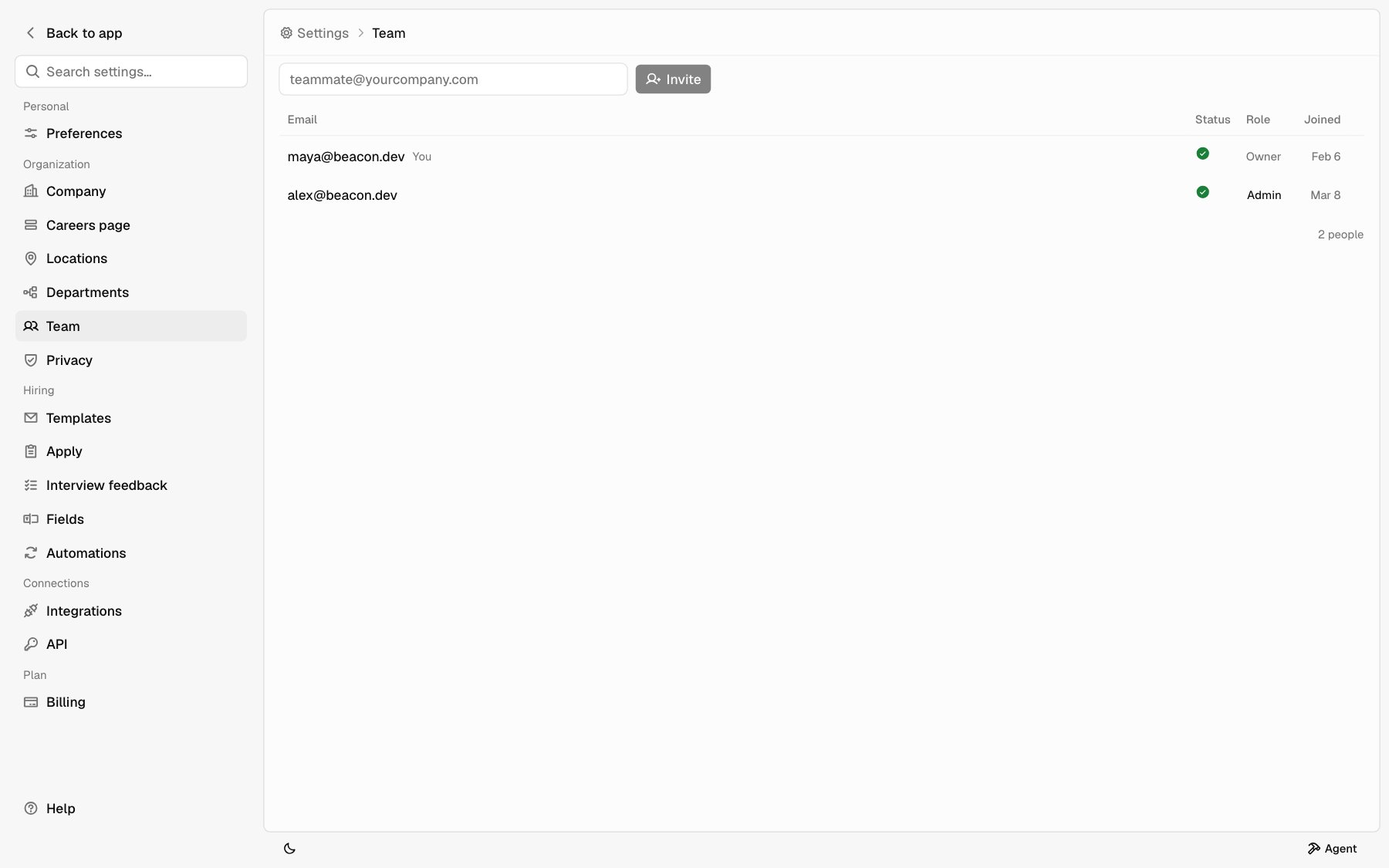
Open **Settings** > **Team** to see everyone on your company. Each row shows **Email**, **Status**, **Role**, and **Joined**. Your own row says **You**.
 ## Roles
Every teammate has one of three roles.
| Role | What they can do |
| - | - |
| **Member** | Use **Inbox**, **Jobs**, and **Analytics**. Post, edit, close, and promote jobs. In Settings, see **Preferences** and a view-only **Team** page. |
| **Admin** | Everything a Member can do. Invite teammates and revoke invites. Manage all company settings: **Company**, **Careers page**, **Locations**, **Departments**, **Privacy**, **Templates**, **Apply**, **Fields**, **Automations**, **Integrations**, and **API**. Set a job's [hiring team](/help/post-a-job#hiring-team). |
| **Owner** | Everything an Admin can do. Change anyone's role. Manage **Billing** and change the plan. |
A company can have more than one Owner.
## Invite a teammate
Owners and Admins can invite.
On **Settings** > **Team**, type your teammate's email in the box at the top.
Click **Invite**. They get an email with an **Accept invitation** button. The link expires in 48 hours.
Your teammate opens the link and signs in with Google or Apple to join.
Everyone joins as a **Member**. An Owner can change their role after they join.
## Status
| Status | Meaning |
| - | - |
| **Active** | They joined. **Joined** shows the date. |
| **Invited** | The invite hasn't been accepted. **Joined** shows when the invite expires. |
Hover the status icon to see the word.
## Revoke an invite
Owners and Admins can cancel an invite that hasn't been accepted. Click **...** on the invite's row and pick **Revoke**.
## Change a role
Only an Owner can change roles.
On **Settings** > **Team**, click the teammate's role.
Choose **Owner**, **Admin**, or **Member**. The change saves right away.
You can't change your own role. The company must always keep at least one Owner.
### Hand over ownership
To make someone else the Owner, set their role to **Owner**. If you no longer want to be an Owner, ask them to change your role.
## Remove a teammate
The Team page doesn't remove teammates who have joined. To limit what someone can do, an Owner can set them to **Member**.
## Billing
Only Owners see **Billing** and can change the plan. If an Admin or Member hits the job limit for your plan, an Owner needs to change the plan. See [Plan job limits](/help/post-a-job#plan-job-limits).
## Related
* [Post a job](/help/post-a-job)
* [Integrations](/help/integrations)
* [Getting around](/help/getting-around)
This documentation is built and hosted on [Mintlify](https://mintlify.com), a developer documentation platform.
## Roles
Every teammate has one of three roles.
| Role | What they can do |
| - | - |
| **Member** | Use **Inbox**, **Jobs**, and **Analytics**. Post, edit, close, and promote jobs. In Settings, see **Preferences** and a view-only **Team** page. |
| **Admin** | Everything a Member can do. Invite teammates and revoke invites. Manage all company settings: **Company**, **Careers page**, **Locations**, **Departments**, **Privacy**, **Templates**, **Apply**, **Fields**, **Automations**, **Integrations**, and **API**. Set a job's [hiring team](/help/post-a-job#hiring-team). |
| **Owner** | Everything an Admin can do. Change anyone's role. Manage **Billing** and change the plan. |
A company can have more than one Owner.
## Invite a teammate
Owners and Admins can invite.
On **Settings** > **Team**, type your teammate's email in the box at the top.
Click **Invite**. They get an email with an **Accept invitation** button. The link expires in 48 hours.
Your teammate opens the link and signs in with Google or Apple to join.
Everyone joins as a **Member**. An Owner can change their role after they join.
## Status
| Status | Meaning |
| - | - |
| **Active** | They joined. **Joined** shows the date. |
| **Invited** | The invite hasn't been accepted. **Joined** shows when the invite expires. |
Hover the status icon to see the word.
## Revoke an invite
Owners and Admins can cancel an invite that hasn't been accepted. Click **...** on the invite's row and pick **Revoke**.
## Change a role
Only an Owner can change roles.
On **Settings** > **Team**, click the teammate's role.
Choose **Owner**, **Admin**, or **Member**. The change saves right away.
You can't change your own role. The company must always keep at least one Owner.
### Hand over ownership
To make someone else the Owner, set their role to **Owner**. If you no longer want to be an Owner, ask them to change your role.
## Remove a teammate
The Team page doesn't remove teammates who have joined. To limit what someone can do, an Owner can set them to **Member**.
## Billing
Only Owners see **Billing** and can change the plan. If an Admin or Member hits the job limit for your plan, an Owner needs to change the plan. See [Plan job limits](/help/post-a-job#plan-job-limits).
## Related
* [Post a job](/help/post-a-job)
* [Integrations](/help/integrations)
* [Getting around](/help/getting-around)
This documentation is built and hosted on [Mintlify](https://mintlify.com), a developer documentation platform.