> ## Documentation Index
> Fetch the complete documentation index at: https://docs.hotfix.jobs/llms.txt
> Use this file to discover all available pages before exploring further.
> ## Agent Instructions
> Product noun is jobs.
> MCP at https://rest.hotfix.jobs/mcp is the hiring contract for agents. Clients sign in with Hotfix; API keys are for HTTP only.
> Do not invent unpublished REST or hiring stats. Webhooks are set up in the app; there is no REST route or MCP tool to manage them.
> Do not mention Greenhouse, Ashby, Quick Apply, or claim.
> Creating a draft, offer, or booking link does not send email.
# Privacy
> Have applicant data deleted a set time after an application closes, and keep the applications you need.
Open **Settings** > **Privacy** to choose how long Hotfix keeps applicant data after an application closes. Owners and Admins can change it. Members can see it but not change it.
Privacy needs a hosted plan. Without one, the page shows **Hosted hiring only** and a **View billing** button.
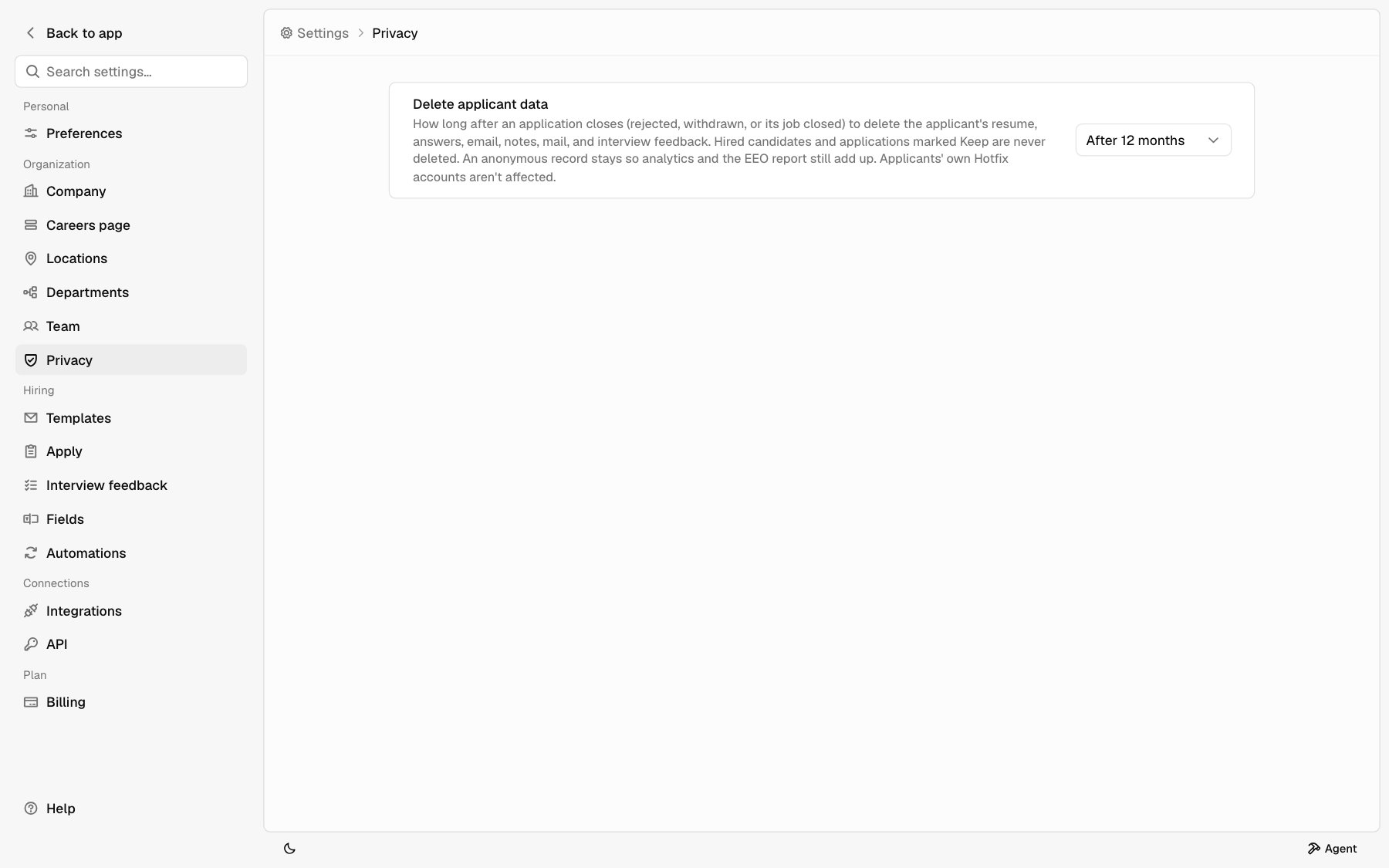 ## Delete applicant data
Pick **Off**, **After 6 months**, **After 12 months**, or **After 24 months**. It starts as **Off**, so nothing is deleted until you choose a window.
An application closes when the first of these happens:
* You reject it. The clock starts when it moved to **Rejected**, and starts over if you move it out and back.
* The applicant withdraws.
* You close its job.
Hired applicants are never deleted. That record becomes your HR file, so keep a copy where you keep those.
Hotfix deletes applications once a day. A change you save applies from the next run, within a day.
### The confirmation
Turning it on, or choosing a shorter window, shows how many applications are already past it, like **3 applications closed more than 6 months ago**. Those are deleted within a day of saving, and it can't be undone. Before you click **Save**, mark any you need as [Keep](#keep-an-application).
A longer window, or **Off**, saves right away. Nothing extra is deleted.
## What gets deleted
For each application past the window:
| Deleted | Kept |
| - | - |
| Resume, cover letter, and every file they uploaded | The job they applied to |
| Name, email, phone, links, and every answer they gave | The status, like **Rejected** |
| Custom field values | When they applied, and when the status moved |
| Notes and the activity feed, except status changes | Where they came from (careers page, channel) |
| Email thread summaries and drafts | Equal opportunity answers, without a name |
| Interviews, interview feedback, and offers | |
| Bells, webhook deliveries, and automation runs about them | |
What's kept is anonymous: no name, email, or anything else that points to a person. It isn't in your inbox, search, Agent, or the API. It keeps [Analytics](/help/analytics) and the [Equal opportunity](/help/analytics#equal-opportunity) totals from dropping as old applications go.
Not deleted, because they don't live in Hotfix:
* Interview events on your Google Calendar, and the email itself in your Gmail. Hotfix stores only a short summary of each thread.
* Anything an Agent chat already showed.
The applicant's own Hotfix account and resume are never touched. Only your company's copy of the application is deleted.
## Keep an application
Mark an application **Keep** to hold it back from deletion, for a legal hold or a candidate you want for a future role.
In the inbox, open the candidate's record. See [Candidate
record](/help/candidate-record).
In the details panel under **Application**, turn on **Keep**. Anyone on your
team can.
Turn **Keep** off to let the application be deleted again. If it's already past the window, it's deleted in the next run. The activity feed shows who marked or removed **Keep**.
Over HTTP, set `keep` on [set\_status](/reference/set-status) or the bulk update. See [Applications](/applications#keep-and-data-retention).
## Your agreement
Your company decides what happens to applicant data, and Hotfix processes it on your instructions. This setting is one of those instructions. See the [Data Processing Addendum](https://hotfix.jobs/dpa), section 8.
## Related
* [Candidate record](/help/candidate-record)
* [Apply settings](/help/apply-settings) for the equal opportunity survey
* [Analytics](/help/analytics)
This documentation is built and hosted on [Mintlify](https://mintlify.com), a developer documentation platform.
## Delete applicant data
Pick **Off**, **After 6 months**, **After 12 months**, or **After 24 months**. It starts as **Off**, so nothing is deleted until you choose a window.
An application closes when the first of these happens:
* You reject it. The clock starts when it moved to **Rejected**, and starts over if you move it out and back.
* The applicant withdraws.
* You close its job.
Hired applicants are never deleted. That record becomes your HR file, so keep a copy where you keep those.
Hotfix deletes applications once a day. A change you save applies from the next run, within a day.
### The confirmation
Turning it on, or choosing a shorter window, shows how many applications are already past it, like **3 applications closed more than 6 months ago**. Those are deleted within a day of saving, and it can't be undone. Before you click **Save**, mark any you need as [Keep](#keep-an-application).
A longer window, or **Off**, saves right away. Nothing extra is deleted.
## What gets deleted
For each application past the window:
| Deleted | Kept |
| - | - |
| Resume, cover letter, and every file they uploaded | The job they applied to |
| Name, email, phone, links, and every answer they gave | The status, like **Rejected** |
| Custom field values | When they applied, and when the status moved |
| Notes and the activity feed, except status changes | Where they came from (careers page, channel) |
| Email thread summaries and drafts | Equal opportunity answers, without a name |
| Interviews, interview feedback, and offers | |
| Bells, webhook deliveries, and automation runs about them | |
What's kept is anonymous: no name, email, or anything else that points to a person. It isn't in your inbox, search, Agent, or the API. It keeps [Analytics](/help/analytics) and the [Equal opportunity](/help/analytics#equal-opportunity) totals from dropping as old applications go.
Not deleted, because they don't live in Hotfix:
* Interview events on your Google Calendar, and the email itself in your Gmail. Hotfix stores only a short summary of each thread.
* Anything an Agent chat already showed.
The applicant's own Hotfix account and resume are never touched. Only your company's copy of the application is deleted.
## Keep an application
Mark an application **Keep** to hold it back from deletion, for a legal hold or a candidate you want for a future role.
In the inbox, open the candidate's record. See [Candidate
record](/help/candidate-record).
In the details panel under **Application**, turn on **Keep**. Anyone on your
team can.
Turn **Keep** off to let the application be deleted again. If it's already past the window, it's deleted in the next run. The activity feed shows who marked or removed **Keep**.
Over HTTP, set `keep` on [set\_status](/reference/set-status) or the bulk update. See [Applications](/applications#keep-and-data-retention).
## Your agreement
Your company decides what happens to applicant data, and Hotfix processes it on your instructions. This setting is one of those instructions. See the [Data Processing Addendum](https://hotfix.jobs/dpa), section 8.
## Related
* [Candidate record](/help/candidate-record)
* [Apply settings](/help/apply-settings) for the equal opportunity survey
* [Analytics](/help/analytics)
This documentation is built and hosted on [Mintlify](https://mintlify.com), a developer documentation platform.