> ## Documentation Index
> Fetch the complete documentation index at: https://docs.hotfix.jobs/llms.txt
> Use this file to discover all available pages before exploring further.
> ## Agent Instructions
> Product noun is jobs.
> MCP at https://rest.hotfix.jobs/mcp is the hiring contract for agents. Clients sign in with Hotfix; API keys are for HTTP only.
> Do not invent unpublished REST or hiring stats. Webhooks are set up in the app; there is no REST route or MCP tool to manage them.
> Do not mention Greenhouse, Ashby, Quick Apply, or claim.
> Creating a draft, offer, or booking link does not send email.
# Billing
> Check your plan and Agent credits, change or cancel your plan, and update how you pay.
Only Owners can open **Settings** > **Billing**. Admins and Members don't see it. See [Team](/help/team) to change someone's role.
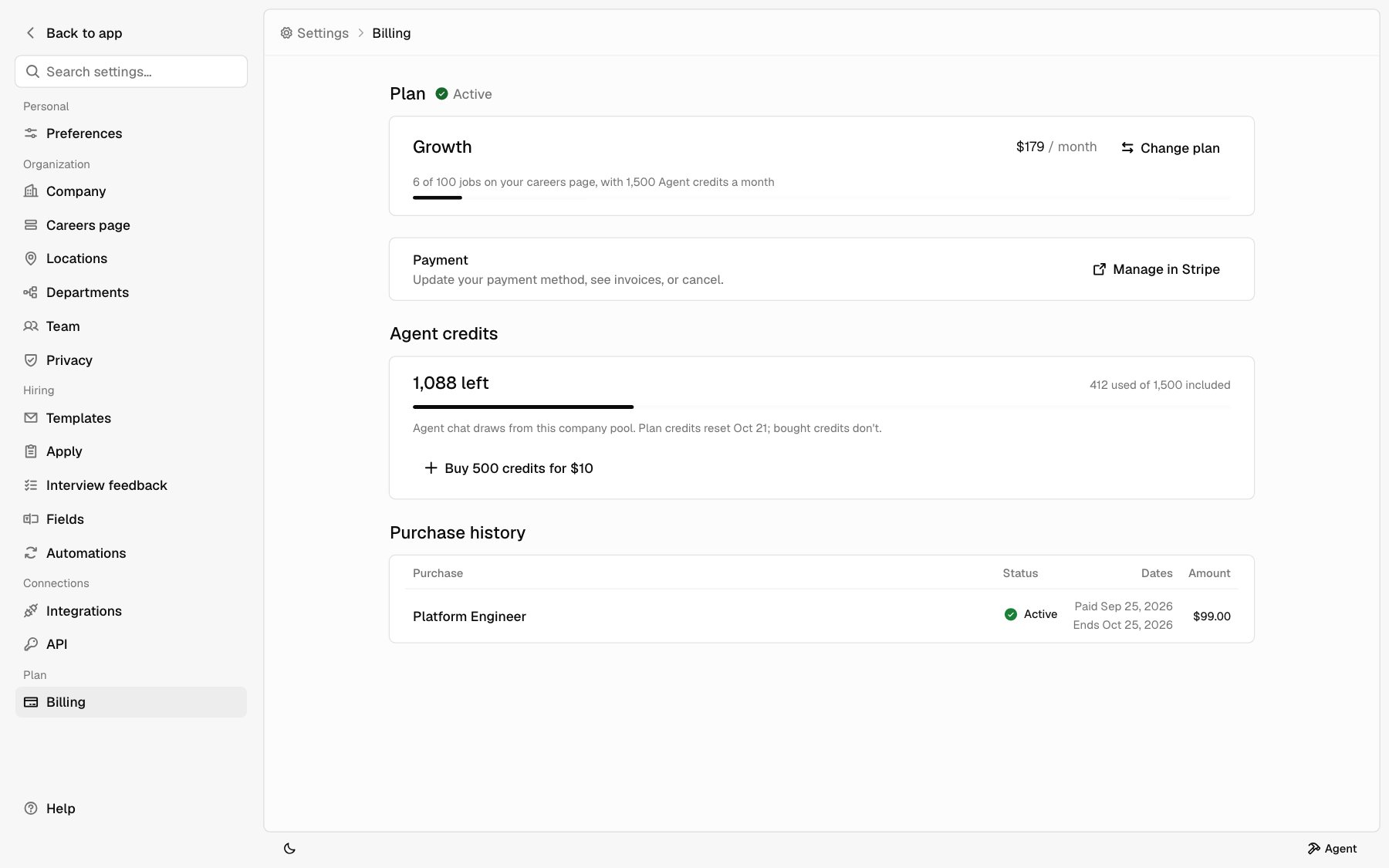
Billing has four parts: **Plan**, **Payment**, **Agent credits**, and **Purchase history**.
For what each plan includes, see [Plans](/help/set-up-hiring#plans). For prices, see [hotfix.jobs/pricing](https://hotfix.jobs/pricing).
 ## Your plan
**Plan** shows your plan's name, its price, and whether you pay each month or each year. Next to **Plan** you see one of these:
| Label | Meaning |
| - | - |
| **Active** | Your plan is paid and current. |
| **Payment failed** | Your last payment didn't go through. Update your payment method in Stripe. |
| **Ends** and a date | You canceled. The plan runs until that date. |
Under the plan name, a bar shows how many jobs are on your careers page out of your plan's limit, and how many Agent credits your plan includes each month.
## Change your plan
Under **Plan**, click **Change plan**. Your current plan is marked
**Current**. Click **Keep plan** to close the picker without changing
anything.
Pick **Monthly** or **Annual, 10% off**, then pick a plan.
Click **Switch plan**. A dialog shows what you pay today and what you pay
after that.
Click **Switch plan** in the dialog. It's charged to the card on file.
The dialog tells you what happens today:
* If something is due, you pay it today, prorated for the rest of the current cycle.
* If nothing is due, the unused time on your current plan is credited to your next invoices.
After that, you pay the new plan's price each month or year.
You can't pick a plan smaller than the number of jobs on your careers page. That plan shows **Close** and the number of jobs to close first. See [Close a job](/help/post-a-job#close-a-job).
## Payment, invoices, and canceling
Under **Payment**, click **Manage in Stripe**. Stripe opens, where you can:
* Update your payment method.
* See your invoices.
* Cancel your plan.
When you cancel, **Plan** shows **Ends** and the date your plan ends. It keeps running until then. To keep your plan, use **Manage in Stripe** to renew before then.
If a payment fails, **Plan** shows **Payment failed**. Update your payment method in Stripe to keep your careers page live.
## Agent credits
**Agent credits** shows how many credits your company has left, how many it used of what's included, and any credits you bought. Next to the heading, **Running low** shows when 20% or less is left, and **Empty** when none are left.
Plan credits reset each month on the date shown. Credits you buy don't reset. See [Agent credits](/help/getting-around#agent-credits) for how Agent uses them.
To buy more:
Click **Buy 500 credits**. The button shows the price.
Pay on Stripe. You come back to **Billing**.
The credits show up once Stripe confirms the payment.
## Purchase history
**Purchase history** lists what you bought besides your plan: featured jobs and Agent credit packs, newest first. Each row shows what you bought, its status, the dates, and the amount. It's hidden until you buy something.
Plan invoices are in Stripe. Click **Manage in Stripe** to see them.
## When a plan ends
If your plan ends, your careers page goes offline. Your jobs and applications stay in the app. **Billing** shows **Ended** and the date next to **Plan**.
**Billing** starts on the plan you had. Pick **Monthly** or **Annual, 10%
off**, and pick a plan. You can't pick a plan smaller than the number of
jobs you had on your careers page.
Check the box to agree to the Customer Agreement and Data Processing
Addendum on behalf of your company.
Click **Reactivate plan** and pay on Stripe. When you come back, Billing
shows **Payment landed. Bringing your careers page back…** until your plan
is active again.
Your company, careers page URL, jobs, and applications are the same as before. See [When a plan ends](/help/set-up-hiring#when-a-plan-ends).
## Related
* [Set up hiring](/help/set-up-hiring)
* [Getting around](/help/getting-around)
* [Team](/help/team)
* [Post a job](/help/post-a-job)
This documentation is built and hosted on [Mintlify](https://mintlify.com), a developer documentation platform.
## Your plan
**Plan** shows your plan's name, its price, and whether you pay each month or each year. Next to **Plan** you see one of these:
| Label | Meaning |
| - | - |
| **Active** | Your plan is paid and current. |
| **Payment failed** | Your last payment didn't go through. Update your payment method in Stripe. |
| **Ends** and a date | You canceled. The plan runs until that date. |
Under the plan name, a bar shows how many jobs are on your careers page out of your plan's limit, and how many Agent credits your plan includes each month.
## Change your plan
Under **Plan**, click **Change plan**. Your current plan is marked
**Current**. Click **Keep plan** to close the picker without changing
anything.
Pick **Monthly** or **Annual, 10% off**, then pick a plan.
Click **Switch plan**. A dialog shows what you pay today and what you pay
after that.
Click **Switch plan** in the dialog. It's charged to the card on file.
The dialog tells you what happens today:
* If something is due, you pay it today, prorated for the rest of the current cycle.
* If nothing is due, the unused time on your current plan is credited to your next invoices.
After that, you pay the new plan's price each month or year.
You can't pick a plan smaller than the number of jobs on your careers page. That plan shows **Close** and the number of jobs to close first. See [Close a job](/help/post-a-job#close-a-job).
## Payment, invoices, and canceling
Under **Payment**, click **Manage in Stripe**. Stripe opens, where you can:
* Update your payment method.
* See your invoices.
* Cancel your plan.
When you cancel, **Plan** shows **Ends** and the date your plan ends. It keeps running until then. To keep your plan, use **Manage in Stripe** to renew before then.
If a payment fails, **Plan** shows **Payment failed**. Update your payment method in Stripe to keep your careers page live.
## Agent credits
**Agent credits** shows how many credits your company has left, how many it used of what's included, and any credits you bought. Next to the heading, **Running low** shows when 20% or less is left, and **Empty** when none are left.
Plan credits reset each month on the date shown. Credits you buy don't reset. See [Agent credits](/help/getting-around#agent-credits) for how Agent uses them.
To buy more:
Click **Buy 500 credits**. The button shows the price.
Pay on Stripe. You come back to **Billing**.
The credits show up once Stripe confirms the payment.
## Purchase history
**Purchase history** lists what you bought besides your plan: featured jobs and Agent credit packs, newest first. Each row shows what you bought, its status, the dates, and the amount. It's hidden until you buy something.
Plan invoices are in Stripe. Click **Manage in Stripe** to see them.
## When a plan ends
If your plan ends, your careers page goes offline. Your jobs and applications stay in the app. **Billing** shows **Ended** and the date next to **Plan**.
**Billing** starts on the plan you had. Pick **Monthly** or **Annual, 10%
off**, and pick a plan. You can't pick a plan smaller than the number of
jobs you had on your careers page.
Check the box to agree to the Customer Agreement and Data Processing
Addendum on behalf of your company.
Click **Reactivate plan** and pay on Stripe. When you come back, Billing
shows **Payment landed. Bringing your careers page back…** until your plan
is active again.
Your company, careers page URL, jobs, and applications are the same as before. See [When a plan ends](/help/set-up-hiring#when-a-plan-ends).
## Related
* [Set up hiring](/help/set-up-hiring)
* [Getting around](/help/getting-around)
* [Team](/help/team)
* [Post a job](/help/post-a-job)
This documentation is built and hosted on [Mintlify](https://mintlify.com), a developer documentation platform.