> ## Documentation Index
> Fetch the complete documentation index at: https://docs.hotfix.jobs/llms.txt
> Use this file to discover all available pages before exploring further.
> ## Agent Instructions
> Call them jobs, not postings, listings, or roles.
> To act for an employer, connect to the MCP server at https://rest.hotfix.jobs/mcp and sign in with a Hotfix account. API keys are for HTTP scripts, not MCP.
> Only describe the routes, tools, and numbers these docs publish. If something isn't documented, say so instead of guessing.
> Webhooks are managed in the app under Settings > API > Webhooks. An API key or MCP client can't create or change them.
> Hotfix is the applicant tracking system. Applications land in Applicants in Hotfix and aren't sent to another ATS.
> Creating a draft, offer, or booking link sends nothing. A person sends the email from Hotfix.
# Agent
> Ask Agent about your applicants, jobs, and automations, and have it draft emails, offers, and booking links you approve.
Agent is a chat assistant inside Hotfix. It looks things up across your applicants, jobs, interviews, and automations, and it drafts the next step for you. Anything that reaches a candidate waits for you to approve it.
Everyone on your team can use Agent: Owners, Admins, and Members. It needs an active plan. See [When a plan ends](/help/set-up-hiring#when-a-plan-ends).
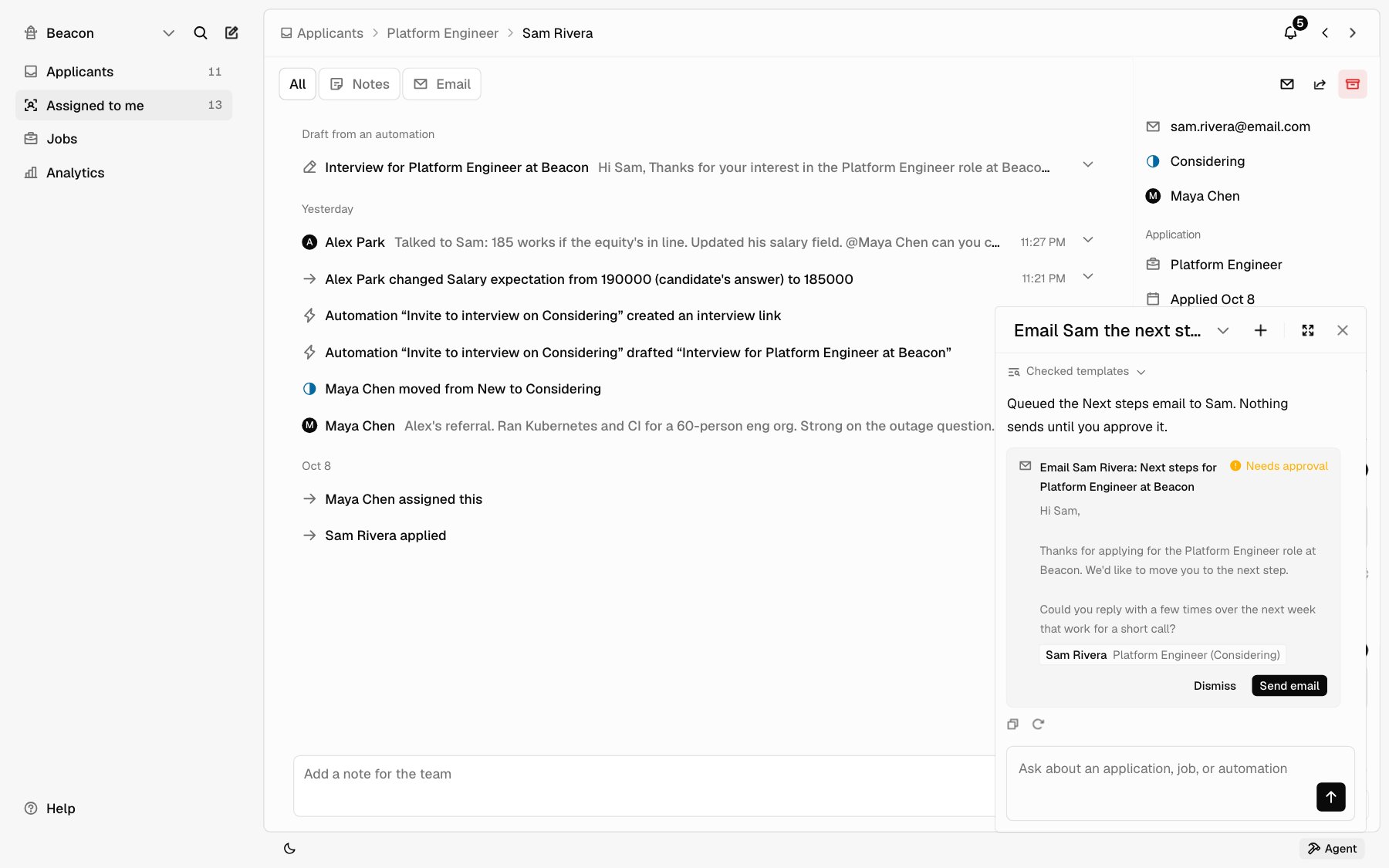 ## Open Agent
Click **Agent** at the bottom right of the app. On a phone, it opens full
screen. Some pages have an **Ask Agent** button too, like **Automations**
when you have none yet.
Type in the box and press Enter, or pick one of the suggestions
under the box. Type `@` to point Agent at an applicant, a job, or a
teammate.
The top of the panel shows the chat you're in. Click its name to see
your other chats: type in **Search chats** to find one, and use
**Delete** on a chat to remove it. **New chat** starts over. **Expand**
fills the main area with the chat, and **Collapse** shrinks it back.
Agent knows which page you're on. With an application open, "Summarize her resume" means that applicant; on a job, "Who's still New?" means that job.
While Agent works, it lists each step it takes, like **Read the resume** or **Checked templates**, so you can see what it looked at.
Under each reply, **Copy** copies the reply, and the thumbs up and thumbs down tell us whether the reply was right. Click the same one again to clear it. Under the last reply, **Retry** asks Agent to answer again. **Stop** ends a reply that's still coming.
## What to ask
| Ask | What Agent does |
| - | - |
| What needs my attention today? | Looks across Applicants for new applications and what's waiting |
| Who applied to Platform Engineer this week? | Lists the applications, with links |
| Summarize Sam's resume | Reads Sam's resume and quotes what it says |
| Which requirements did Sam show? | Quotes Sam's line for each of the job's requirements, or Not found |
| Who mentioned Kubernetes? | Searches notes, email Hotfix sent, and resumes |
| How did the panel land on Sam? | Summarizes the interview feedback, where the panel agrees and splits |
| Email Sam the next steps template | Shows a card with the email, ready to send |
| Send Sam an interview booking link | Shows a card for a booking link |
| Draft an offer for Priya | Shows a card with the offer |
| Add a note to Sam: strong systems answers | Adds the note |
| Move Blair to Interviewing | Moves the application |
| Make an automation that emails rejected candidates after 3 days | Builds the automation, paused |
## What Agent can do
**Look things up.** Applications by job and status; one application, with its answers and requirements; an applicant's resume, as the same word-for-word copy you read; notes; the email Hotfix sent and who sent it when; interviews; panel feedback; offers; your jobs; your team; email templates; and your automations and their runs.
**Act right away.** Add a note, move an application to another status, save a draft letter, and create or edit a paused automation. These change only your own workspace, so they don't wait.
**Prepare, then wait for you.** These show a card first:
* Sending an email. Agent always uses one of your saved [templates](/help/templates), and it goes from your own Google Workspace mailbox.
* Creating an offer, or rescinding one that's waiting.
* Creating a booking link, or canceling an interview.
* Rejecting someone you didn't clearly name. "Reject Dana" goes ahead; "Should we reject Dana?" shows a card.
* Turning an automation on, or changing one that's already on.
Nothing happens until you click the card's button, like **Send email**. Click **Dismiss** to drop it. After you approve an email, Agent may offer to move the applicant too, like to **Considering**. That's one more click, and nothing moves without it.
## What Agent won't do
* **Rank or score applicants.** It never picks a best candidate. It quotes what applicants wrote so you can decide.
* **Screen people out by a rule.** It won't reject everyone missing a skill or a requirement, and it rejects one named person per message. To reject several at once, select them in [Applicants](/help/applicants).
* **Guess about people.** It doesn't infer age, gender, or other personal traits from a resume.
* **Read candidates' replies.** It sees the email Hotfix sent and who replied, not what they wrote. Open the thread in Applicants to read a reply.
* **See more than you can.** If interview feedback is hidden until you add yours, or only the job's hiring team can read it, Agent says so.
* **Post or edit jobs.** Do that in [Jobs](/help/post-a-job), or from an app connected over [Hiring MCP](/hiring-mcp).
* **Change how Hotfix works.** If you tell it something is broken or should work differently, it says so and may add a **Feedback for the Hotfix team** card with a short draft. **Review and send** opens **Feedback** with the draft, and nothing is sent until you send it.
## Who sees your chats
Each chat is yours. Teammates can't open it, and it stays with this company. Owners see how many Agent replies each teammate got this month on [Billing](/help/billing#agent), but not what anyone asked.
## Agent use
Agent is included on every plan. There are no credits to buy or count.
Very heavy use in a month switches Agent to a faster model until the next month starts. Agent says so under the chat, with the date it switches back. Far past that, Agent pauses for your company until the month turns; [contact us](https://hotfix.jobs/contact) if you need it sooner. Most companies never see either.
Owners see this month's Agent replies, by day and by teammate, under **Settings** > **Billing**. Billing also warns when your team is close to the month's included use.
## Agent, Automations, or MCP
| | Agent | [Automations](/help/automations) | [Hiring MCP](/hiring-mcp) |
| - | - | - | - |
| **What it is** | A chat in the app | Rules that run the same way every time | Your own AI app, like Claude or ChatGPT |
| **Runs when** | You ask | Something happens, or on a schedule | You ask in that app |
| **Judgment** | Reads and summarizes; you decide | None: fixed rules | Whatever that app does; you decide |
| **Sends email** | Only after you approve a card | Only a scheduled template email | Never on its own; a person still hits Send |
| **Best for** | Questions, summaries, and drafting a step | Steps you'd repeat for every applicant | Working Hotfix from tools you already use |
This documentation is built and hosted on [Mintlify](https://mintlify.com), a developer documentation platform.
## Open Agent
Click **Agent** at the bottom right of the app. On a phone, it opens full
screen. Some pages have an **Ask Agent** button too, like **Automations**
when you have none yet.
Type in the box and press Enter, or pick one of the suggestions
under the box. Type `@` to point Agent at an applicant, a job, or a
teammate.
The top of the panel shows the chat you're in. Click its name to see
your other chats: type in **Search chats** to find one, and use
**Delete** on a chat to remove it. **New chat** starts over. **Expand**
fills the main area with the chat, and **Collapse** shrinks it back.
Agent knows which page you're on. With an application open, "Summarize her resume" means that applicant; on a job, "Who's still New?" means that job.
While Agent works, it lists each step it takes, like **Read the resume** or **Checked templates**, so you can see what it looked at.
Under each reply, **Copy** copies the reply, and the thumbs up and thumbs down tell us whether the reply was right. Click the same one again to clear it. Under the last reply, **Retry** asks Agent to answer again. **Stop** ends a reply that's still coming.
## What to ask
| Ask | What Agent does |
| - | - |
| What needs my attention today? | Looks across Applicants for new applications and what's waiting |
| Who applied to Platform Engineer this week? | Lists the applications, with links |
| Summarize Sam's resume | Reads Sam's resume and quotes what it says |
| Which requirements did Sam show? | Quotes Sam's line for each of the job's requirements, or Not found |
| Who mentioned Kubernetes? | Searches notes, email Hotfix sent, and resumes |
| How did the panel land on Sam? | Summarizes the interview feedback, where the panel agrees and splits |
| Email Sam the next steps template | Shows a card with the email, ready to send |
| Send Sam an interview booking link | Shows a card for a booking link |
| Draft an offer for Priya | Shows a card with the offer |
| Add a note to Sam: strong systems answers | Adds the note |
| Move Blair to Interviewing | Moves the application |
| Make an automation that emails rejected candidates after 3 days | Builds the automation, paused |
## What Agent can do
**Look things up.** Applications by job and status; one application, with its answers and requirements; an applicant's resume, as the same word-for-word copy you read; notes; the email Hotfix sent and who sent it when; interviews; panel feedback; offers; your jobs; your team; email templates; and your automations and their runs.
**Act right away.** Add a note, move an application to another status, save a draft letter, and create or edit a paused automation. These change only your own workspace, so they don't wait.
**Prepare, then wait for you.** These show a card first:
* Sending an email. Agent always uses one of your saved [templates](/help/templates), and it goes from your own Google Workspace mailbox.
* Creating an offer, or rescinding one that's waiting.
* Creating a booking link, or canceling an interview.
* Rejecting someone you didn't clearly name. "Reject Dana" goes ahead; "Should we reject Dana?" shows a card.
* Turning an automation on, or changing one that's already on.
Nothing happens until you click the card's button, like **Send email**. Click **Dismiss** to drop it. After you approve an email, Agent may offer to move the applicant too, like to **Considering**. That's one more click, and nothing moves without it.
## What Agent won't do
* **Rank or score applicants.** It never picks a best candidate. It quotes what applicants wrote so you can decide.
* **Screen people out by a rule.** It won't reject everyone missing a skill or a requirement, and it rejects one named person per message. To reject several at once, select them in [Applicants](/help/applicants).
* **Guess about people.** It doesn't infer age, gender, or other personal traits from a resume.
* **Read candidates' replies.** It sees the email Hotfix sent and who replied, not what they wrote. Open the thread in Applicants to read a reply.
* **See more than you can.** If interview feedback is hidden until you add yours, or only the job's hiring team can read it, Agent says so.
* **Post or edit jobs.** Do that in [Jobs](/help/post-a-job), or from an app connected over [Hiring MCP](/hiring-mcp).
* **Change how Hotfix works.** If you tell it something is broken or should work differently, it says so and may add a **Feedback for the Hotfix team** card with a short draft. **Review and send** opens **Feedback** with the draft, and nothing is sent until you send it.
## Who sees your chats
Each chat is yours. Teammates can't open it, and it stays with this company. Owners see how many Agent replies each teammate got this month on [Billing](/help/billing#agent), but not what anyone asked.
## Agent use
Agent is included on every plan. There are no credits to buy or count.
Very heavy use in a month switches Agent to a faster model until the next month starts. Agent says so under the chat, with the date it switches back. Far past that, Agent pauses for your company until the month turns; [contact us](https://hotfix.jobs/contact) if you need it sooner. Most companies never see either.
Owners see this month's Agent replies, by day and by teammate, under **Settings** > **Billing**. Billing also warns when your team is close to the month's included use.
## Agent, Automations, or MCP
| | Agent | [Automations](/help/automations) | [Hiring MCP](/hiring-mcp) |
| - | - | - | - |
| **What it is** | A chat in the app | Rules that run the same way every time | Your own AI app, like Claude or ChatGPT |
| **Runs when** | You ask | Something happens, or on a schedule | You ask in that app |
| **Judgment** | Reads and summarizes; you decide | None: fixed rules | Whatever that app does; you decide |
| **Sends email** | Only after you approve a card | Only a scheduled template email | Never on its own; a person still hits Send |
| **Best for** | Questions, summaries, and drafting a step | Steps you'd repeat for every applicant | Working Hotfix from tools you already use |
This documentation is built and hosted on [Mintlify](https://mintlify.com), a developer documentation platform.